JavaScript SEO is about making sure Google can find your content, links and page information, even when JavaScript builds part of the page. Google can run JavaScript, but that does not guarantee every element will be discovered or indexed. Pages that depend on scripts, clicks or delayed requests can expose less information than visitors see. The practical solution is to compare the original HTML with the version Google renders, identify what is missing and correct the specific problem rather than rebuilding the entire website.
How Google processes JavaScript pages
A browser normally receives HTML from a website’s server. HTML describes the page’s content, headings, links and other elements. JavaScript can then change that document by adding text, loading information or creating interactive features.
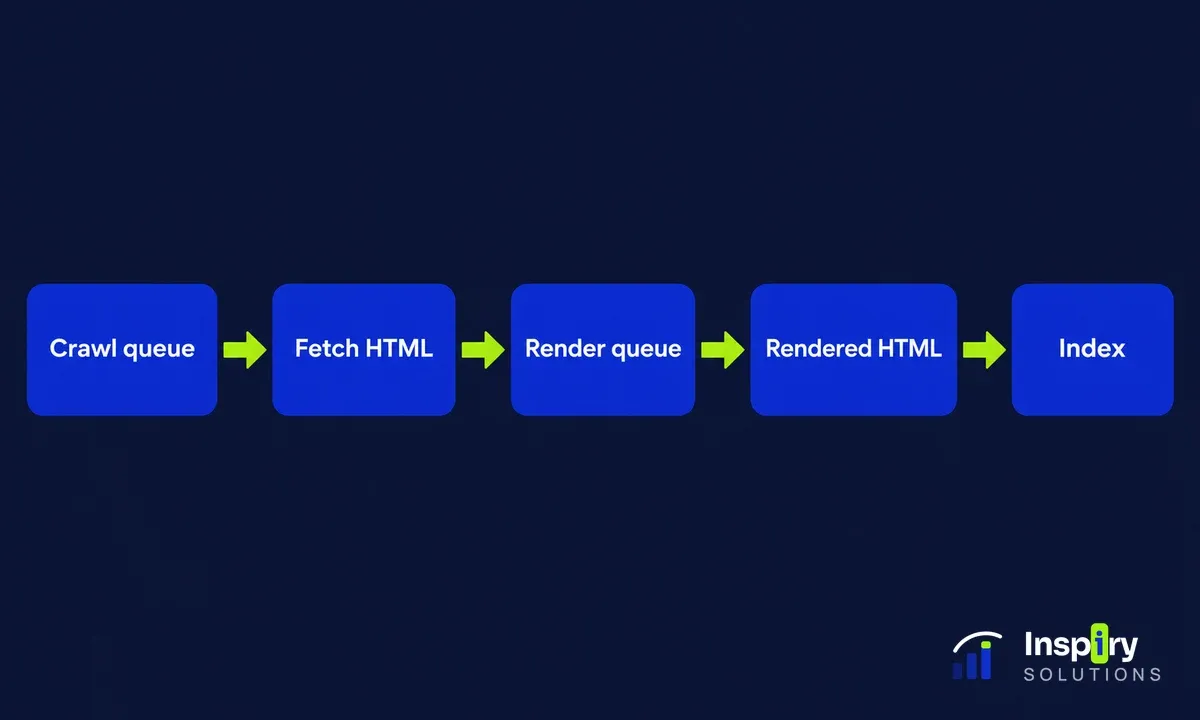
Google’s process involves three related activities:
Crawling: Googlebot discovers a URL and fetches its initial HTML and accessible resources.
Rendering: Google’s Web Rendering Service runs supported JavaScript to construct the page after scripts execute.
Indexing: Google evaluates the available content and signals to decide whether and how to include the page in its index.
According to Google’s JavaScript SEO documentation , Google Search runs JavaScript with an evergreen version of Chromium, meaning a regularly updated version of the browser engine.
However, Google says Googlebot queues pages for both crawling and rendering, and it is not always obvious which queue a page is waiting in. Rendering requires resources, so it may not happen immediately after the HTML is fetched.
Our guide to rendering as a cause of missing pages covers the wider checks when a URL fails to appear in search.
What about other crawlers?
Not every system uses Google’s rendering process.
Many AI crawlers retrieve HTML and may not execute JavaScript. Some search engine crawlers also provide less JavaScript support than Googlebot.
OpenAI, for example, documents separate crawler user agents for different purposes. Their existence does not mean every crawler renders client-side content like a browser.
For broader discoverability, placing important information in the initial HTML is the safer approach. This principle also matters when making pages accessible to AI tools .
Server-side, static and client-side rendering
Rendering means turning page code and data into the content a browser or crawler can examine.
The location and timing of that work influence how much information arrives in the first HTML response.
Static generation creates HTML in advance, usually when a website is built or content is published. Visitors receive a ready-made document.
Server-side rendering (SSR) generates HTML on the server when a page is requested. The server sends the content rather than requiring the browser to build everything.
Client-side rendering (CSR) sends an HTML shell that JavaScript fills in after loading. This is common in certain single-page applications.
Hydration is when JavaScript adds interactive behaviour to HTML already produced by the server.
Rendering comparison
Approach What Google receives first SEO risk Typical use Static generation Prebuilt HTML containing the page content Low when generated output is complete Marketing pages, articles, service pages Server-side rendering HTML generated by the server for the request Low when properly implemented Content-driven sites with frequently changing data Client-side rendering Often an HTML shell with limited visible content Higher dependency on successful rendering Interactive dashboards and applications Hybrid (server render then hydrate) Content-rich HTML followed by JavaScript enhancements Low when initial content is complete Modern React and framework-based websites Dynamic rendering Different output for crawlers and users Maintenance and consistency risks; Google no longer recommends it as a workaround Legacy implementations
For most business content pages, however, server-side or static output is the safer default because headings, paragraphs and links can be examined before scripts execute.
The correct choice depends on what the page does. An account dashboard may benefit from client-side interaction, while a public service description rarely needs to depend entirely on it.
Our technical SEO reviews assess the actual delivered output before recommending framework or template changes.
Five JavaScript patterns that hide content or links
JavaScript is not inherently an SEO defect. Problems occur when implementation decisions prevent crawlers from discovering URLs, accessing important content or interpreting page-level instructions.
A developer may make a card or button navigate to another page using JavaScript. Visitors click it successfully, so nobody notices a problem.
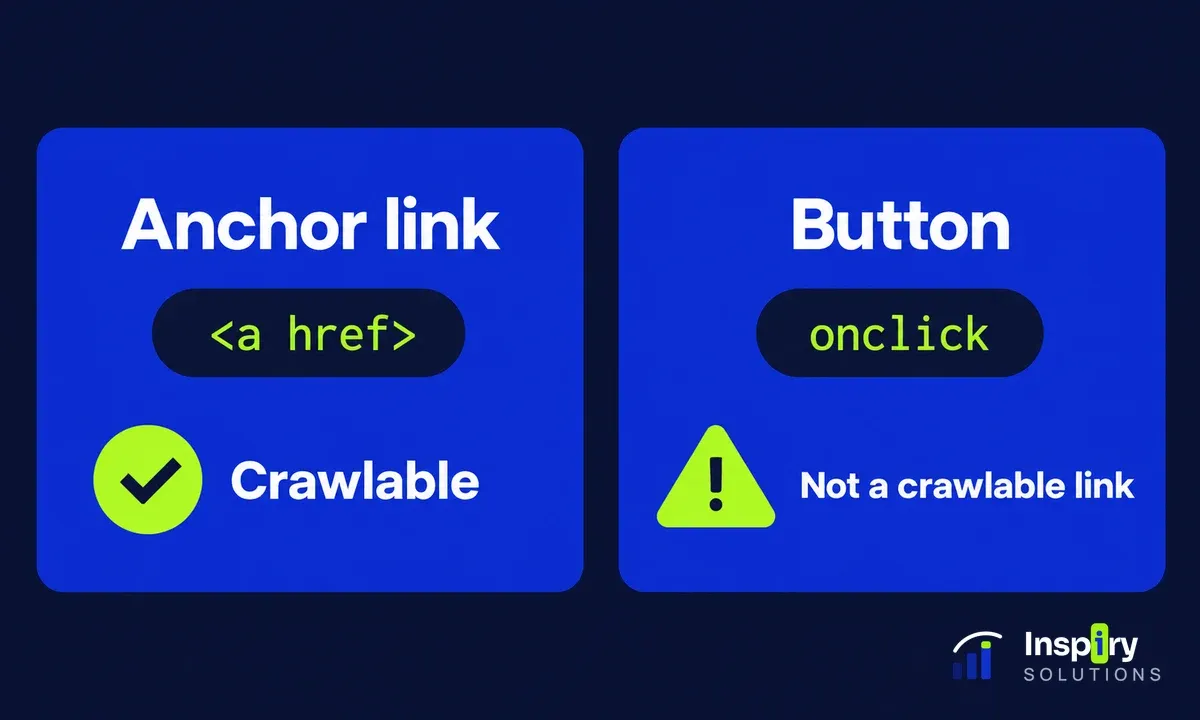
But Google primarily discovers links through HTML anchor elements containing an href attribute.
A button with an onclick handler might navigate in a browser without providing a crawlable link.
The difference is straightforward:
<!-- Preferred: a crawlable link -->
<a href="/services/website-design/">
  Website design
</a>

<!-- Risky: navigation depends on JavaScript -->
<button onclick="openService()">
  Website design
</button>
In rendered HTML, inspect the service navigation and confirm that destinations are actual anchors with meaningful href values.
Google’s guidance on crawlable links explains why this matters.
Our article about links Google can follow covers how internal navigation supports service-page discovery.
Hypothetical example: A firm’s new website lists services in a JavaScript tab component, with each tab implemented as a button. Google indexes the main page but finds no links to the individual service pages through those controls. Changing the tabs to real links with href values would fix discovery without changing the design.
Content loaded only after a click or scroll
A common interface loads text when visitors open an accordion, select a tab or scroll near a section.
The problem is not the existence of these controls. It is whether important content exists without an interaction Google may never perform.
For example, a service page might initially contain only a heading. Its full description appears after a visitor presses a button.
Check the rendered HTML for a distinctive sentence from each important section. If the sentence is absent, investigate whether the content requires an event, permission or additional request.
The safest fix is usually to provide meaningful content in the HTML and use JavaScript to control how it is displayed.
Titles, descriptions or canonicals set only by JavaScript
A page’s title, meta description and canonical element communicate important information about that URL.
Some applications generate or replace these elements through JavaScript after the first HTML response. Google can process JavaScript-injected metadata, but depending on rendering adds avoidable complexity.
A more serious problem occurs when the initial HTML and rendered HTML disagree.
For instance, an application might serve the same generic title for every service page, then replace it with a unique title after loading. A canonical element could similarly point to the wrong URL before or after rendering.
Inspect both versions for the </code> element, meta description and canonical link.</p>
<p class="wp-block-paragraph">If they differ, establish which version is correct and where it is generated.</p>
<p class="wp-block-paragraph">For public content pages, ask the developer to include accurate metadata in the initial server response. Avoid conflicting canonical elements and unnecessary JavaScript changes to critical SEO signals.</p>
<h3 id="fragment-ur-ls-used-for-separate-pages" class="wp-block-heading">Fragment URLs used for separate pages</h3>
<p class="wp-block-paragraph">A fragment is the portion of a URL following the <code>#</code> character. Fragments are useful for jumping to sections within a document, but they are not a reliable way to represent separate indexable pages.</p>
<p class="wp-block-paragraph">Consider a website that uses:</p>
<pre class="wp-block-code"><code>/services/#design</code></pre>
<pre class="wp-block-code"><code>/services/#development</code></pre>
<p class="wp-block-paragraph">The server typically receives the same <code>/services/</code> request for both. The fragment itself is not sent in the HTTP request.</p>
<p class="wp-block-paragraph">If JavaScript uses those fragments to create entirely different page content, crawlers may not recognise the intended pages as separate URLs.</p>
<p class="wp-block-paragraph">Check whether your service categories have distinct, crawlable addresses that work when opened directly.</p>
<p class="wp-block-paragraph">If each service needs its own search presence, use proper paths such as <code>/services/design/</code> and <code>/services/development/</code>.</p>
<h3 id="blocked-java-script-or-api-files" class="wp-block-heading">Blocked JavaScript or API files</h3>
<p class="wp-block-paragraph">Even correctly written JavaScript cannot produce content if required resources are unavailable to Google’s renderer.</p>
<p class="wp-block-paragraph">Scripts, stylesheets or API endpoints might be blocked by robots.txt rules, security restrictions, authentication or server errors.</p>
<p class="wp-block-paragraph">Inspect the rendered HTML and screenshot. If a content block is empty, examine resource-loading errors and confirm that required public endpoints are accessible without signing in.</p>
<p class="wp-block-paragraph">A useful developer investigation includes the resource URL, its response status, whether access is restricted and the content that should have appeared.</p>
<p class="wp-block-paragraph">Do not remove security protections indiscriminately. Public content should have an appropriate public delivery method rather than requiring privileged access.</p>
<h2 id="test" class="wp-block-heading">Test what Google sees</h2>
<p class="wp-block-paragraph">The most useful JavaScript SEO test compares two versions of the same URL: the raw HTML delivered by the server and the rendered HTML produced after Google processes the page.</p>
<p class="wp-block-paragraph">Choose an important public URL, preferably a service page with headings, text, navigation links and metadata.</p>
<h3 id="step-1-view-source" class="wp-block-heading">Step 1: view source</h3>
<p class="wp-block-paragraph">Open the page in a desktop browser.</p>
<p class="wp-block-paragraph">Right-click and choose View Page Source, or use the browser’s <code>view-source:</code> URL feature.</p>
<p class="wp-block-paragraph">This reveals the HTML delivered initially. It does not display the current page after JavaScript modifications.</p>
<p class="wp-block-paragraph">Search for a distinctive sentence in the page’s main content. Also look for important internal links, the title element and canonical URL.</p>
<p class="wp-block-paragraph">If you find only an empty root element or loading message, the site may depend heavily on client-side rendering.</p>
<figure class="wp-block-image size-full"><img src="/_astro/javascript-seo-rendering-diagram-2_Z1F6Vp.webp" srcset="/_astro/javascript-seo-rendering-diagram-2_Z1zWEvT.webp 400w, /_astro/javascript-seo-rendering-diagram-2_QbysM.webp 640w, /_astro/javascript-seo-rendering-diagram-2_2x3LNQ.webp 800w, /_astro/javascript-seo-rendering-diagram-2_1DMgM5.webp 1080w, /_astro/javascript-seo-rendering-diagram-2_Z1F6Vp.webp 1200w" sizes="(min-width: 1208px) 760px, (min-width: 1101px) calc(86vw - 260px), (min-width: 836px) 760px, 91vw" width="1200" height="720" loading="lazy" decoding="async" alt="Raw HTML showing an empty outlined container beside rendered HTML with a heading, text lines and buttons" class="wp-image-1009"></figure>
<h3 id="step-2-url-inspection-live-test" class="wp-block-heading">Step 2: URL Inspection live test</h3>
<p class="wp-block-paragraph">Open Google Search Console and choose a verified property containing your website.</p>
<p class="wp-block-paragraph">Enter the exact URL into the URL Inspection tool.</p>
<p class="wp-block-paragraph">Review the available information about the indexed URL, then select Test Live URL to request a fresh test.</p>
<p class="wp-block-paragraph">When the test is available, open View Tested Page and examine the HTML and screenshot. Inspect the available resource and diagnostic information as well.</p>
<p class="wp-block-paragraph">Search the HTML for your selected text and links. Remember that the live test shows a test result, not a guarantee that Google has indexed that version.</p>
<h3 id="step-3-compare-the-two" class="wp-block-heading">Step 3: compare the two</h3>
<p class="wp-block-paragraph">Now compare the initial source with Google’s rendered output.</p>
<figure class="wp-block-table" tabindex="0"><table><thead><tr><th>Element</th><th>Raw HTML check</th><th>Rendered HTML check</th></tr></thead><tbody><tr><td>Main heading</td><td>Is the expected heading present?</td><td>Is the heading still correct?</td></tr><tr><td>Service description</td><td>Does the text arrive initially?</td><td>Does the full text appear?</td></tr><tr><td>Internal links</td><td>Are there anchors with <code>href</code>?</td><td>Are destination links present?</td></tr><tr><td>Page title</td><td>Is the correct title included?</td><td>Has JavaScript changed it?</td></tr><tr><td>Canonical</td><td>Does it reference the intended URL?</td><td>Is there one correct canonical?</td></tr><tr><td>Important images</td><td>Are image references present?</td><td>Are images loading as expected?</td></tr></tbody></table></figure>
<p class="wp-block-paragraph">Record what is missing rather than simply marking the page as failed.</p>
<p class="wp-block-paragraph">For example, a complete raw document with missing internal links is a different issue from a blank page caused by an API error.</p>
<h2 id="status-codes" class="wp-block-heading">Status codes and error pages in JavaScript apps</h2>
<p class="wp-block-paragraph">A URL’s HTTP status code tells crawlers how the server handled its request.</p>
<p class="wp-block-paragraph">A successful page normally returns <code>200 OK</code>. A missing page should generally return <code>404 Not Found</code> or <code>410 Gone</code>, depending on the situation.</p>
<p class="wp-block-paragraph">Some single-page applications serve the same HTML shell with a <code>200</code> response for every URL, including paths that do not exist.</p>
<p class="wp-block-paragraph">JavaScript then displays a custom error message.</p>
<p class="wp-block-paragraph">A crawler may receive a successful status code but encounter content saying the page is missing. Google may classify this as a soft 404.</p>
<p class="wp-block-paragraph">The preferable solution is for the server to return the appropriate status code when a URL does not exist.</p>
<p class="wp-block-paragraph">Where genuine server-side status handling is impractical, Google’s JavaScript SEO guidance discusses using a <code>noindex</code> directive for client-side error views.</p>
<p class="wp-block-paragraph">A real <code>404</code> response remains the cleaner default.</p>
<p class="wp-block-paragraph">Ask your developer to test both valid and deliberately invalid URLs using an HTTP response inspection tool.</p>
<h2 id="platforms" class="wp-block-heading">What this means for WordPress, headless and builder sites</h2>
<p class="wp-block-paragraph">Your website’s platform affects where rendering happens, but the platform name alone cannot tell you whether content is crawlable.</p>
<h3 id="standard-word-press-websites" class="wp-block-heading">Standard WordPress websites</h3>
<p class="wp-block-paragraph">Traditional WordPress themes generally generate content-rich HTML on the server using PHP, so important text usually arrives before browser JavaScript executes.</p>
<p class="wp-block-paragraph">WordPress can still have SEO problems, including poor internal links, incorrect canonicals and thin content. Those should not automatically be described as JavaScript rendering failures.</p>
<h3 id="headless-word-press-websites" class="wp-block-heading">Headless WordPress websites</h3>
<p class="wp-block-paragraph">A headless setup uses WordPress to manage content while a separate application displays it.</p>
<p class="wp-block-paragraph">A client-rendered frontend that loads every article or service description through browser requests introduces additional dependencies.</p>
<p class="wp-block-paragraph">For business content, consider server-side generation, static generation or a suitable hybrid approach.</p>
<p class="wp-block-paragraph">Our guide to <a href="/insights/headless-wordpress-business-website/">headless WordPress for business sites</a> explains the architectural trade-offs.</p>
<h3 id="page-builders-sliders-and-interactive-widgets" class="wp-block-heading">Page builders, sliders and interactive widgets</h3>
<p class="wp-block-paragraph">Page builders do not automatically create JavaScript SEO problems. Many Elementor sections generate normal HTML that crawlers can inspect without user interaction.</p>
<p class="wp-block-paragraph">Risk increases when third-party sliders, tabs, AJAX widgets or custom scripts inject important text and links later.</p>
<p class="wp-block-paragraph">See our discussion of <a href="/insights/elementor-seo/">builder markup problems</a> for related Elementor SEO considerations.</p>
<h3 id="questions-to-ask-before-selecting-a-framework" class="wp-block-heading">Questions to ask before selecting a framework</h3>
<p class="wp-block-paragraph">Before approving React or another JavaScript-heavy frontend for a marketing website, ask:</p>
<ul class="wp-block-list">
<li>Will public pages deliver their main content in the initial HTML?</li>
<li>Can crawlers discover service links without performing clicks?</li>
<li>Are titles, canonicals and status codes generated correctly?</li>
<li>Can developers test rendered output before a release?</li>
<li>Does the business actually need the complexity of a separate frontend?</li>
</ul>
<p class="wp-block-paragraph">The problem is selecting an architecture based on interface features without considering content delivery, maintenance and testing.</p>
<h2 id="fixes" class="wp-block-heading">JavaScript SEO fixes to ask your developer for</h2>
<p class="wp-block-paragraph">A useful technical SEO request names the affected template, the missing element and the evidence needed to confirm a fix.</p>
<p class="wp-block-paragraph">Start with these priorities:</p>
<ol class="wp-block-list">
<li>Provide server-side or static HTML for indexable pages. Important headings, descriptions and internal links should not require fragile client-side requests.</li>
<li>Use real links. Internal navigation should use <code><a></code> elements with usable <code>href</code> destinations rather than relying only on click handlers.</li>
<li>Include correct metadata initially. Set titles, descriptions and canonical elements in the delivered HTML wherever practical.</li>
<li>Return meaningful status codes. Missing pages should not silently return successful responses.</li>
<li>Verify resources and rendered output. Test actual public URLs using Search Console, not only a local development environment.</li>
</ol>
<p class="wp-block-paragraph">A focused developer brief might read:</p>
<p class="wp-block-paragraph">> On the services template, the individual service links are missing from Google’s rendered HTML. Replace the JavaScript-only navigation with anchor elements containing the correct href values. The work is complete when all service URLs appear in the rendered HTML during a Search Console live test and open independently.</p>
<p class="wp-block-paragraph">For another template, the correct fix might involve an API, the server response or metadata generation.</p>
<p class="wp-block-paragraph">Always retest after deployment. A change that appears correct in browser DevTools may behave differently when accessed by a crawler.</p>
<h2 id="common-questions" class="wp-block-heading">Common questions</h2>
<div class="post-faq"><div class="post-qa"><h3 id="can-google-read-java-script-content" class="wp-block-heading">Can Google read JavaScript content?</h3>
<p class="wp-block-paragraph">Yes. Google renders JavaScript with a recent Chromium browser and can evaluate content added after the initial HTML response. However, rendering can be delayed, and some patterns still hide content or links. Important information may be missed when it depends on user interactions, inaccessible resources or broken scripts. Testing rendered output is more reliable than assuming JavaScript support guarantees discoverability.</p>
</div><div class="post-qa"><h3 id="do-ai-crawlers-render-java-script" class="wp-block-heading">Do AI crawlers render JavaScript?</h3>
<p class="wp-block-paragraph">Many AI crawlers fetch HTML and may not run JavaScript like a full browser. Their capabilities and purposes vary, so behaviour should not be assumed to match Google’s rendering service. Content in the initial HTML is safer for every system because it reduces dependence on script execution. Accessible HTML also makes it easier for different tools to retrieve important page information.</p>
</div><div class="post-qa"><h3 id="is-client-side-rendering-bad-for-seo" class="wp-block-heading">Is client-side rendering bad for SEO?</h3>
<p class="wp-block-paragraph">Not always. Google can render many client-side applications successfully. However, client-side rendering adds risk and dependency on JavaScript execution, resource availability and rendering schedules. Server-side or static rendering is the safer default for content pages, especially service descriptions and articles. The right decision depends on the page’s purpose, implementation and how consistently its content can be retrieved.</p>
</div><div class="post-qa"><h3 id="how-do-i-see-what-google-sees-on-my-page" class="wp-block-heading">How do I see what Google sees on my page?</h3>
<p class="wp-block-paragraph">Use URL Inspection in Google Search Console and run a live test. Open the rendered HTML and screenshot to inspect important headings, content and internal links. Compare those results with the page source, which shows the initial server response. This comparison helps identify content introduced by JavaScript and reveals whether the rendered version is missing anything important.</p>
</div><div class="post-qa"><h3 id="is-my-word-press-site-affected-by-java-script-seo" class="wp-block-heading">Is my WordPress site affected by JavaScript SEO?</h3>
<p class="wp-block-paragraph">Standard WordPress themes usually output HTML on the server, so their main content often does not depend on client-side rendering. Risk comes from headless frontends, certain builder components, sliders, tabs and custom JavaScript features. A WordPress website can still have ordinary SEO problems. Inspect a representative page before assuming that JavaScript is responsible for missing content or indexing issues.</p>
</div></div><h2 id="next-step" class="wp-block-heading">Check before the next release</h2>
<p class="wp-block-paragraph">A rendering check belongs in website release testing, particularly when developers update frameworks, replace page components or change how content is loaded.</p>
<p class="wp-block-paragraph">Choose representative URLs from your important templates and compare the initial HTML with the rendered output.</p>
<p class="wp-block-paragraph">Confirm that headings, service descriptions, internal links, titles and canonical elements remain available. Also verify that missing URLs return suitable HTTP status codes.</p>
<p class="wp-block-paragraph">If your site relies on JavaScript and you are not sure what Google sees, our <a href="/services/technical-seo/">technical SEO review</a> compares raw and rendered output on your key templates and we fix what is missing. Send your URL for a free audit.</p>
</article><aside class="post-author" id="author" aria-label="About the author"><img src="/_astro/founder-photo.CPuhCiQR_Z1I84LM.webp" srcset="/_astro/founder-photo.CPuhCiQR_VnWIc.webp 64w, /_astro/founder-photo.CPuhCiQR_Z2or2iw.webp 128w" sizes="64px" width="171" height="192" alt="Mian Rizwan, founder of Inspiry Solutions" class="post-author-face" loading="lazy" decoding="async"><div><p class="post-author-n"><a href="/about/">Mian Rizwan</a></p><p class="post-author-r">Founder, Inspiry Solutions</p><p class="post-author-t">Mian has worked with WordPress since 2014 and reviews every project that comes through the studio. He is Top Rated Plus on Upwork, with 100% Job Success and 68 reviews, and has 150+ projects behind him.</p><p class="post-author-l"><a href="https://www.upwork.com/freelancers/~01d4df085d87634216" rel="noopener">See the reviews on Upwork</a></p></div></aside></div></div><section class="section post-more" id="more" aria-labelledby="more-h"><div class="post-more-head"><h2 id="more-h" class="h2">Keep reading<span class="post-dot">.</span></h2><a class="post-all" href="/insights/">All guides<svg viewBox="0 0 24 24" aria-hidden="true"><path d="M5 12h14M13 6l6 6-6 6" /></svg></a></div><ul class="post-cards"><li class="gc" data-tag="Technical SEO" data-astro-cid-bz4ik2y5><div class="ra gp" data-astro-cid-mr2lkur5><img src="/_astro/03-cover_Z1BHIFm.webp" srcset="/_astro/03-cover_VrTmq.webp 240w, /_astro/03-cover_1sWjPT.webp 360w, /_astro/03-cover_201uxI.webp 540w, /_astro/03-cover_2w5Ffx.webp 720w, /_astro/03-cover_JoFIY.webp 960w" sizes="(min-width: 1406px) 424px, (min-width: 901px) calc(32.8vw - 37px), (min-width: 601px) 30vw, 88px" width="1600" height="900" alt loading="lazy" decoding="async"></div><div class="gc-body" data-astro-cid-bz4ik2y5><p class="gc-meta" data-astro-cid-bz4ik2y5><span class="gc-tag" data-astro-cid-bz4ik2y5>Technical SEO</span><span data-astro-cid-bz4ik2y5><time datetime="2026-10-04T04:00:00Z" data-astro-cid-bz4ik2y5>4 October 2026</time> · 9 min read</span></p><h3 class="gc-t" data-astro-cid-bz4ik2y5><a href="/insights/google-not-indexing-website/" data-astro-cid-bz4ik2y5>Why Google is not indexing your website</a></h3><p class="gc-d" data-astro-cid-bz4ik2y5>Diagnose 15 reasons important pages may be missing from Google’s index, identify the evidence behind each cause, and choose the right repair.</p></div></li><li class="gc" data-tag="Guide" data-astro-cid-bz4ik2y5><div class="ra gp" data-astro-cid-mr2lkur5><img src="/_astro/headless-wordpress-business-website-cover_Z2d8r9s.webp" srcset="/_astro/headless-wordpress-business-website-cover_Z2rj3l2.webp 240w, /_astro/headless-wordpress-business-website-cover_Z14qi8.webp 360w, /_astro/headless-wordpress-business-website-cover_1FfAs4.webp 540w, /_astro/headless-wordpress-business-website-cover_Z1HBvAF.webp 720w, /_astro/headless-wordpress-business-website-cover_Z1wjqHa.webp 960w" sizes="(min-width: 1406px) 424px, (min-width: 901px) calc(32.8vw - 37px), (min-width: 601px) 30vw, 88px" width="1600" height="900" alt loading="lazy" decoding="async"></div><div class="gc-body" data-astro-cid-bz4ik2y5><p class="gc-meta" data-astro-cid-bz4ik2y5><span class="gc-tag" data-astro-cid-bz4ik2y5>Guide</span><span data-astro-cid-bz4ik2y5><time datetime="2026-11-08T11:00:00Z" data-astro-cid-bz4ik2y5>8 November 2026</time> · 12 min read</span></p><h3 class="gc-t" data-astro-cid-bz4ik2y5><a href="/insights/headless-wordpress-business-website/" data-astro-cid-bz4ik2y5>Headless WordPress</a></h3><p class="gc-d" data-astro-cid-bz4ik2y5>Headless WordPress makes sense when a business needs content across multiple platforms or has specific technical requirements that justify extra maintenance.</p></div></li><li class="gc" data-tag="Guide" data-astro-cid-bz4ik2y5><div class="ra gp" data-astro-cid-mr2lkur5><img src="/_astro/elementor-seo-cover_PCmIN.webp" srcset="/_astro/elementor-seo-cover_Z2o1p7C.webp 240w, /_astro/elementor-seo-cover_1UGsqj.webp 360w, /_astro/elementor-seo-cover_Z27f1Xe.webp 540w, /_astro/elementor-seo-cover_Z14YnxP.webp 720w, /_astro/elementor-seo-cover_Zl08vm.webp 960w" sizes="(min-width: 1406px) 424px, (min-width: 901px) calc(32.8vw - 37px), (min-width: 601px) 30vw, 88px" width="1600" height="900" alt loading="lazy" decoding="async"></div><div class="gc-body" data-astro-cid-bz4ik2y5><p class="gc-meta" data-astro-cid-bz4ik2y5><span class="gc-tag" data-astro-cid-bz4ik2y5>Guide</span><span data-astro-cid-bz4ik2y5><time datetime="2026-10-31T11:00:00Z" data-astro-cid-bz4ik2y5>31 October 2026</time> · 12 min read</span></p><h3 class="gc-t" data-astro-cid-bz4ik2y5><a href="/insights/elementor-seo/" data-astro-cid-bz4ik2y5>Elementor SEO</a></h3><p class="gc-d" data-astro-cid-bz4ik2y5>Elementor SEO problems usually come from incorrect heading levels, duplicated responsive content and poorly configured templates, not the page builder itself.</p></div></li></ul></section></div><section class="cta-sec" id="contact" data-reveal=""><div class="cta-glow"></div><div class="in"><p class="eyebrow" style="justify-content:center">Next step</p><h2 class="cta-h">Want this looked at on <span class="grad">your website?</span></h2><p class="cta-sub">Send the site and a few lines about what is going wrong. Mian replies by email within one working day with a short initial review of your issue: what he would check first and how he would approach it.</p><form class="audit-form on-dark" style="justify-content:center; max-width:560px; margin-inline:auto" action="https://cms.inspirysolutions.com/wp-json/inspiry/v1/audit" method="post" data-audit-form data-success="Thanks. We will reply to {email} within one working day." data-error="Sorry, that didn't send. Please try again, or email hello@inspirysolutions.com."><fieldset class="fld fld-topic"><legend class="fld-k">What is this about?</legend><div class="topic-opts"><label class="topic-opt"><input type="radio" name="topic" value="problem" checked><span>A technical problem</span></label><label class="topic-opt"><input type="radio" name="topic" value="project"><span>A new project</span></label><label class="topic-opt"><input type="radio" name="topic" value="agency"><span>Agency support</span></label></div></fieldset><div class="fld"><label class="fld-k" for="audit-iqmjzh-site">Website address (optional)</label><label class="field"><span class="prefix" aria-hidden="true">https://</span><input id="audit-iqmjzh-site" type="text" name="site" inputmode="url" autocomplete="url" placeholder="your-website.com" pattern="(https?:\/\/)?([a-zA-Z0-9]([a-zA-Z0-9\-]{0,61}[a-zA-Z0-9])?\.)+[a-zA-Z]{2,63}(:\d{2,5})?([\/?#]\S*)?" maxlength="253"></label></div><div class="fld"><label class="fld-k" for="audit-iqmjzh-email">Email address</label><label class="field field-email"><input id="audit-iqmjzh-email" type="email" name="email" inputmode="email" autocomplete="email" placeholder="you@company.com" maxlength="254" required></label></div><div class="fld fld-note"><label class="fld-k" for="audit-iqmjzh-note">Your message</label><label class="field field-note"><textarea id="audit-iqmjzh-note" name="note" rows="3" maxlength="2000" placeholder="A few lines on what is happening or what you need"></textarea></label></div><input type="hidden" name="source" value="insights-closing"><label class="hp" aria-hidden="true">Leave this empty <input type="text" name="company_website" tabindex="-1" autocomplete="off"></label><button type="submit" class="btn btn-glow">Send it over</button></form><p class="audit-msg" id="audit-iqmjzh-msg" role="status" aria-live="polite" style="text-align:center"></p><p class="form-privacy" style="text-align:center">We only use your details to reply to you. <a href="/privacy/">Privacy notice</a></p></div></section></main><div class="mobile-cta"><a href="#contact" class="btn btn-glow" style="text-decoration:none">Get WordPress help</a></div><footer class="footer"><div class="in"><div class="foot-top"><div class="foot-brand"><a class="brand brand-img" href="/" data-tone="light"><img class="logo logo--white" src="/brand/inspiry-logo-white.svg" width="645" height="182" alt="Inspiry Solutions"><img class="logo-mark logo--white" src="/brand/inspiry-mark-white.svg" width="34" height="34" alt="Inspiry Solutions" loading="lazy"></a><p>Inspiry Solutions is a founder-led WordPress technical studio, set up by Mian Rizwan in October 2019, that fixes, improves and supports WordPress sites for agencies and businesses in the UK, US and Norway.</p></div><div class="foot-talk"><span class="ft-k">Talk to us</span><a class="ft-mail" href="mailto:hello@inspirysolutions.com">hello@inspirysolutions.com</a><p>Replies within one working day. Remote studio, with clients in the UK, US and Norway.</p></div></div><nav class="foot-links" id="footer-nav" aria-label="Footer"><a href="/services/">All services</a><a href="/services/wordpress-development/">WordPress development</a><a href="/services/website-performance/">Performance</a><a href="/services/technical-seo/">Technical SEO</a><a href="/services/wordpress-maintenance/">WordPress maintenance</a><a href="/services/shopify-development/">Shopify development</a><a href="/services/local-seo/">Local SEO</a><a href="/services/ai-visibility/">AI visibility</a><span class="ft-sep" aria-hidden="true"></span><a href="/#agencies">For agencies</a><a href="/work/">Work</a><a href="/about/">About</a><a href="/contact/">Contact</a><a href="/insights/">Insights</a><a href="/#faq">FAQ</a></nav><div class="foot-base"><span>© 2026 Inspiry Solutions · <a href="/privacy/">Privacy</a></span><a href="https://www.upwork.com/freelancers/~01d4df085d87634216" target="_blank" rel="noopener">Top Rated Plus on Upwork · 100% Job Success<span class="sr-only"> (opens in a new tab)</span></a></div></div></footer><script type="module" src="/_astro/BaseLayout.astro_astro_type_script_index_0_lang.ByqEbpCG.js"></script><script defer src="https://static.cloudflareinsights.com/beacon.min.js" data-cf-beacon="{"token":"6070fa9ce44848768563c77562bb07d6"}"></script></body></html><script type="module">var e=document.querySelector(`[data-toc]`),t=e?.querySelector(`.post-toc-h`),n=matchMedia(`(max-width: 1100px)`),r=r=>{e?.toggleAttribute(`data-open`,r),n.matches&&t?.setAttribute(`aria-expanded`,String(r))},i=()=>{if(e&&t){if(n.matches)t.setAttribute(`role`,`button`),t.tabIndex=0,t.setAttribute(`aria-controls`,`toc-list`),t.setAttribute(`aria-expanded`,String(e.hasAttribute(`data-open`)));else{for(let e of[`role`,`tabindex`,`aria-controls`,`aria-expanded`])t.removeAttribute(e);e.removeAttribute(`data-open`)}}},a=()=>{n.matches&&r(!e.hasAttribute(`data-open`))};if(i(),n.addEventListener(`change`,i),t?.addEventListener(`click`,a),t?.addEventListener(`keydown`,e=>{n.matches&&(e.key===`Enter`?(e.preventDefault(),a()):e.key===` `&&e.preventDefault())}),t?.addEventListener(`keyup`,e=>{n.matches&&e.key===` `&&(e.preventDefault(),a())}),e){let t=new Map([...e.querySelectorAll(`a`)].map(e=>[decodeURIComponent(e.hash.slice(1)),e])),n=[...t.keys()].map(e=>document.getElementById(e)).filter(e=>e!==null),i=()=>{let e=n[0];for(let t of n)t.getBoundingClientRect().top<innerHeight*.3&&(e=t);t.forEach((t,n)=>n===e?.id?t.setAttribute(`aria-current`,`true`):t.removeAttribute(`aria-current`))},a=!1;addEventListener(`scroll`,()=>{a||(a=!0,requestAnimationFrame(()=>{a=!1,i()}))},{passive:!0}),i(),e.addEventListener(`click`,t=>{let n=t.target.closest(`a`),i=n&&e.hasAttribute(`data-open`)?document.getElementById(decodeURIComponent(n.hash.slice(1))):null;n&&i&&(t.preventDefault(),r(!1),history.pushState(null,``,n.hash),i.setAttribute(`tabindex`,`-1`),i.focus({preventScroll:!0}),i.scrollIntoView({behavior:matchMedia(`(prefers-reduced-motion: reduce)`).matches?`auto`:`smooth`}))})}</script>